Typically, portals provide information from various different sources. Information may be provided by pages, portlets, task flows, content repositories, and external pages. Users need a way to easily move through this information and quickly access the specific information that they need. You provide this access to information through your portal navigation. The navigation model defines the content, structure, and metadata of the navigation. When you create the navigation model, you specify the items to include and the hierarchy of those items. Navigation models can include the following resources, for example, pages, external resource, page queries, and other navigation models.
Using the navigation model, you can then create a UI menu, using a combination of standard HTML tags, JSTL, and Epresssion Language (EL) to interate through the model collection. The rendering, or look-n-feel of the menu is implemented by the CSS (skin).
In this blog I will not be covering the creation of the navigation model, since there are numerous blogs covering this topic. Rather I will focus more on how to render the menu in the UI, and also point out a hidden property on the naigation model that will enable you to write less code when iterating through the navigation model's collection.
Let's look at a example of a navigation model, which was created in Spaces. (Note: The following information are also relevent in a 'custom' WebCenter Portal Application).
Basically, there are 3 main (top) links (i.e. Parents), and 2 'children' under the Parent 1 link. One of the children in this model is a regular (link) to a Page, and the other child is a Page Query (which can return a collection of Pages. Using the Preview option in the Edit navigation model, the model will display the desire behavior in the UI.
As you can see, the Page Query also returns it's own collection of pages. Now that we have the navaigation model in place, we now need to create the UI code that will iterate through the naigation model's collection. As I mentioned before, I will use in this example standard code. The following is the code that I will use to visualize my navigation model:
When I add the code to my Space Page Template, and refresh the View, the following get displayed:
So far so good. I can see the hierarchy of the links have stamped out correctly. In addition, the code that is iterating through the model collection is pretty straight foward. You will also notice that there are also CSS style classes set on many of the code elements to enable the to look like a standard menu (with it's children as menu items). When I add the CSS to my Spaces Page Template as a standard adf resource, and rerun the page, you can see the look like a standard menu:
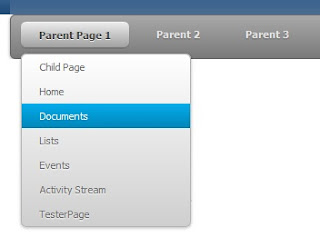
OK, now that is what I am expecting, a nice menu, which supports a hierarchtical navigation model. Now, I would like to take the navigation model one step further (later exposing the hidden gem), by adding a navigation model reference into my main navigation model. Basically, a navigation model reference enables the model to add it's model collection to the main models collection. For this example, I will create a simple navigatio model, which has only 3 parent pages. (Note: you are not contrained to this, since this this is a full navigation model):
Back in the (main) navigation model, I will add this navigation model (under Parent 3) in the main as a navigation model reference:
Previewing the main navigation model, I can see that I am able to view the reference navigation model's child links:
Now when I rerun the template, I should be able to see the navigation model child links, just like the Page Query:
Great! Now lets change this up a bit. Since my code is set to iterate through the multi-levels, I would like to add the navigation model reference as a child to another child (i.e. grandchild).
Re-running the template:
Great, the UI code can still handle the multi-levels! So what is the hidden gem? When you create a navigation reference in Spaces (unlike-custom WC Portal app), there is an attribute property that gets set for you automatically. For example, the following is the navigation model code snippet from my demo:
includeNavigation id="newincl5" insertFolderContents="true"
It is the insertFolderContents attribute, which enables the collection to 'bubble up' past the initially nav model reference. What I mean is that the navigation model reference inside of another navigation model, is actually a 'folder', that then holds it's children. So setting the insertFolderContents= false, (or in the case of doing these operations in the JDeveloper custom Portal application), not having this attribute set at all, will not let the navigation model reference expose it's children in the current UI code. You can, however, write additional code to 'check' to see if the current node is a 'folder'. But, that would me writing more code for every level of the hierarchy. I would rather ensure that this attribute is set to 'true'.


Hi,
ReplyDeleteGreat tutorial! I am trying to implement this in my web center portal application. Styles with UL and LI works. But the link doesn't work. When I click on the link, it shows me ERROR 404. Should I have to do anything. Can you please help me with this issue. Thanks.
Hi Martin,
ReplyDeleteThis is very good post. But even I am facing the same problem , Rajasree/martin any workaround?
Thanks
Namit
Nice effort, very informative, this will help me to complete my task. Thanks for sharing it. Have a look at the process blogs to see more...........................Please contact us for Oracle Fusion Financials training details in our Erptree Training Institute
ReplyDeleteThis is very good post. Please For More Details ... Click The Link.
ReplyDeleteOracle SQL Training in Al Karama, Dubai
Save more with affordable tyre solutions from 24/7 Mobile Tyre Service Melbourne. We offer quality tyres at competitive online prices along with fast mobile tyre fitting, puncture repairs, and emergency roadside assistance across Melbourne. Our reliable team is available 24/7 to keep you safely on the road with quick and convenient service.
ReplyDeletehttps://247mobiletyreservicemelbourne.com.au/services/tyre-sales-and-fitting/
Receive professional and compassionate pregnancy support through antenatal shared care services at Balgowlah Village Medical Practice. Our experienced medical team works closely with hospitals and specialists to provide comprehensive care throughout your pregnancy journey. We focus on the health and wellbeing of both mother and baby with personalised guidance, regular check-ups, and supportive healthcare services.
ReplyDeletehttps://balgowlahvillagemedicalpractice.com.au/
Create unforgettable celebrations with professional event planning services from Boujee By Ashtons. From baby showers and birthdays to corporate functions and luxury-themed events, our creative team delivers beautifully styled experiences tailored to your vision. We focus on every detail to ensure your event is elegant, stress-free, and memorable for every guest.
ReplyDeletehttps://boujeebyashtons.com.au/
Bring new life to your swimming pool with expert renovation services from Adelaide Aqua Boys. Whether your pool needs resurfacing, equipment upgrades, modern tiling, or complete restoration, our experienced team delivers high-quality pool renovation solutions tailored to your outdoor space. We help Adelaide homeowners create beautiful, clean, and functional pools designed for long-lasting enjoyment.
ReplyDeletehttps://adelaideaquaboys.com.au/
Protect your teeth during sports and physical activities with custom mouth guards from Prodental Clinic. Our professionally designed mouth guards provide a secure fit, enhanced comfort, and reliable protection against dental injuries. Suitable for children and adults, our high-quality mouth guards help safeguard your smile while allowing you to play confidently.
ReplyDeletehttps://prodentalclinic.com.au/
Wondering if refinancing is right for you? Use our home loan refinance calculator and let our experts assess your situation. We identify opportunities to improve your loan structure, interest rate, or repayment flexibility through smart refinancing strategies.
ReplyDeletehttps://kandidloans.com.au/refinance-home-loan/